


Phone number: (315) 930-4535
Email: sales@buyitsolutions.com
Address: 241-40 86th Rd Jamaica New York 11426 United States
EIN NUMBER: 93-2319428
D-U-N-S Number: 130972525
Skip to product information


Logitech
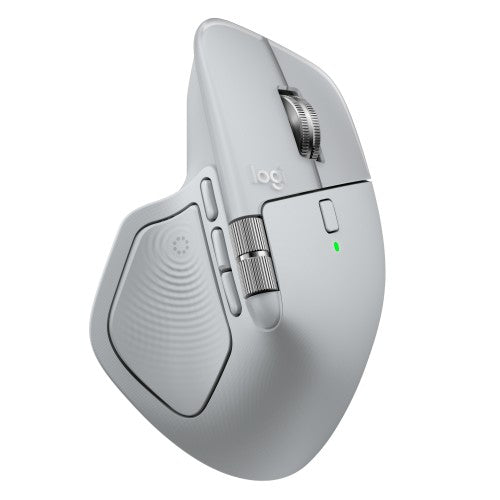
Logitech MX Master 4 mouse Office Right-hand RF Wireless + Bluetooth Laser 8000 DPI
SKU:
910-007559
Condition: New
$125.18 USD
Pickup currently not available
✔
Factory-Sealed
Sourced from authorized distributors
✔
Manufacturer Warranty
Terms set by the brand
✔
Enterprise Expertise
Business Procurement

Free standard shipping over $2,500
Delivery estimates are based on product availability, destination, fulfillment method, and qualifying order requirements. 30-day returns; 20% restocking fee on non-defective returns. Shipping policy · Return policy
Loading documents...
Need Help Before You Order?
Check compatibility, availability, or volume pricing with an IT procurement specialist.

Enterprise IT Procurement Built for Business
Source servers, networking, storage, workstations, and business technology through established distribution channels with dedicated procurement support.
1,700+
Business Accounts Supported
32,000+
Enterprise Hardware Products Available

Fast, Reliable Procurement Support
Reach out for responsive product availability, part numbers, pricing, and additional hardware needs.
4–8 Hrs
Typical RFQ Response Target
Multi-Vendor
Hardware Sourcing

Keep Your IT Projects Moving
For business hardware purchases and larger deployments, get shipment information, order coordination, and delivery support.

Manufacturer Warranty Coverage
Eligible products include warranty coverage provided by the original manufacturer according to applicable brand and product terms.
Brand Warranty TermsFactory-Sealed HardwareOEM Support Eligibility

A Trusted Source for Enterprise Hardware
Source factory-sealed IT hardware through established technology distribution channels, with support for individual purchases, BOM requests, and larger business requirements.
112+
Technology Brands
32,000+
Hardware Products Available
Key Features
MX Master 4, Pale Grey
Our most advanced wireless mouse, supercharged
MX Master 4 is a high-performance mouse with haptic feedback, designed for an immersive and precise workflow you can feel. Save up to 33% of your time* with Actions Ring shortcuts, accessing tools and actions directly at your cursor.
Immerse yourself with the Haptic Sense Panel
with customizable* haptic feedback on specific actions, shortcuts, notifications enhancing productivity. Feel the snap of images snapping onto grids, notifications, desktop switching, slider adjustments and more. Customize feedback, intensity, and add plugins for 3rd party apps with Logi Options+ for a more personalized workflow.
*Requires Logi Options+ app, available for Windows and macOS at app.logi.com
Save up to 33% of your time with Actions Ring shortcuts*
Keep your workflow flowing with the Actions Ring, bringing your favorite tools, shortcuts, and actions right to your cursor. Skip all the menu searching and reduce your mouse movements by up to 63%*. Personalize shortcuts and download plugins for third-party apps with Logi Options+ to make the Actions Ring work for you.
*Logitech Ergo Lab study (2025) with 37 MX Master mouse users tested across 8 desktop actions. Results may vary depending on assigned shortcuts.
Scroll 1,000 lines per second
Flow through tasks with the MagSpeed scroll wheel, Logitech’s fastest and most precise scrolling experience*. Switch effortlessly between ratchet mode—87% more precise** —and hyper-fast mode, 90% faster*, zipping through 1,000 lines per second. The machined steel wheel is smooth, quiet, and weighted for perfect glide control.
*Compared to regular Logitech mouse without an electromagnetic scroll wheel., **Compared to Logitech Master 2S mouse with Logitech Options installed and Smooth scrolling enabled
Track on any surface, even glass* with the 8K DPI sensor
Track with precision using an 8,000 DPI sensor that works on virtually any surface—even glass*. Logitech’s most accurate sensor ever is 5x more precise than a basic mouse**, delivering responsive, pixel-perfect control for large screens and focused workflows.
*4 mm minimum glass thickness., **Compared to a regular Logitech mouse with default DPI setting.
Experience 2 x more powerful connectivity*
Powered by an advanced radio chip, improved antenna placement, and a next-gen USB-C dongle, MX Master 4 keeps you connected faster, stronger, and more reliably. Say goodbye to interruptions and hello to seamless workflows.
*Compared to MX Master 3S
More comfort. Deeper focus.
MX Master 4 is designed to keep you comfortable and in the flow for hours. It’s optimized tilt angle keep your arms in a more natural posture and it’s ideally positioned buttons allow for quick and intuitive navigation. Even the scroll wheel follows the natural movement of the thumb for fluid and intuitive horizontal navigation.
Deeper flow with 90% less click noise*
Quiet Clicks on the MX Master 4 keeps you in your flow with less noise and fewer distractions. Designed for those who create, code, or collaborate, Quiet Click buttons deliver a satisfying feel – but with 90% less click noise*. You’ll get the same performance, precision, and reliability, but with less click sounds.
*Compared to MX Master 3, MX Master 4 has 90% less Sound Power Level left and right click.
Do more with Logi Options+
Take control of your MX Master 4 with Logi Options+*. Use the Flow feature to seamlessly share files, copy, and paste across devices and operating systems. Customize button shortcuts, tracking speed, and app-specific presets for editing, designing, or coding. Automate tasks with Smart Actions and expand functionality with plugins—making your tools work the way you do.
*Requires Logi Options+ app, available for Windows and macOS at app.logi.com
Work seamlessly across devices and OS
Connect with up to three devices and switch between them via Actions Ring or Easy-switch buttons on the mouse and transfer your files across devices seamlessly with Logi Options+*. Designed for versatility, MX Master 4 works seamlessly across major operating systems—Windows, macOS, Linux**, ChromeOS**, iPadOS**, and Android**—right out of the box. No tricky setup, just instant compatibility.
*Requires Logi Options+ app, available for Windows and macOS at app.logi.com., **Device basic functions will be supported without software for other systems than Windows and macOS
USB-C quick charging, long lasting
With USB-C quick charging (charging cable not included), MX Master 4 delivers up to 70 days of power on a full charge—and three hours of use from just a one-minute quick charge*. Need a recharge? Simply plug in and keep working,—no awkward pauses, just seamless productivity**.
*Battery life may vary based on user and computing conditions., **Charging cable not included.
Description
Meet the MX Master 4 that brings immersive control and precision you can feel with customizable haptic feedback on specific actions. Save up to 33% of your time with Actions Ring shortcuts and MX Master 4, by accessing tools and filters at your cursor. Additional features: 2x better connectivity, ultra fast scrolling with the MagSpeed scroll wheel, 8k DPI any surface tracking, including glass & Logi Options+ for customization.Our most advanced wireless mouse, supercharged
MX Master 4 is a high-performance mouse with haptic feedback, designed for an immersive and precise workflow you can feel. Save up to 33% of your time* with Actions Ring shortcuts, accessing tools and actions directly at your cursor.
Immerse yourself with the Haptic Sense Panel
with customizable* haptic feedback on specific actions, shortcuts, notifications enhancing productivity. Feel the snap of images snapping onto grids, notifications, desktop switching, slider adjustments and more. Customize feedback, intensity, and add plugins for 3rd party apps with Logi Options+ for a more personalized workflow.
*Requires Logi Options+ app, available for Windows and macOS at app.logi.com
Save up to 33% of your time with Actions Ring shortcuts*
Keep your workflow flowing with the Actions Ring, bringing your favorite tools, shortcuts, and actions right to your cursor. Skip all the menu searching and reduce your mouse movements by up to 63%*. Personalize shortcuts and download plugins for third-party apps with Logi Options+ to make the Actions Ring work for you.
*Logitech Ergo Lab study (2025) with 37 MX Master mouse users tested across 8 desktop actions. Results may vary depending on assigned shortcuts.
Scroll 1,000 lines per second
Flow through tasks with the MagSpeed scroll wheel, Logitech’s fastest and most precise scrolling experience*. Switch effortlessly between ratchet mode—87% more precise** —and hyper-fast mode, 90% faster*, zipping through 1,000 lines per second. The machined steel wheel is smooth, quiet, and weighted for perfect glide control.
*Compared to regular Logitech mouse without an electromagnetic scroll wheel., **Compared to Logitech Master 2S mouse with Logitech Options installed and Smooth scrolling enabled
Track on any surface, even glass* with the 8K DPI sensor
Track with precision using an 8,000 DPI sensor that works on virtually any surface—even glass*. Logitech’s most accurate sensor ever is 5x more precise than a basic mouse**, delivering responsive, pixel-perfect control for large screens and focused workflows.
*4 mm minimum glass thickness., **Compared to a regular Logitech mouse with default DPI setting.
Experience 2 x more powerful connectivity*
Powered by an advanced radio chip, improved antenna placement, and a next-gen USB-C dongle, MX Master 4 keeps you connected faster, stronger, and more reliably. Say goodbye to interruptions and hello to seamless workflows.
*Compared to MX Master 3S
More comfort. Deeper focus.
MX Master 4 is designed to keep you comfortable and in the flow for hours. It’s optimized tilt angle keep your arms in a more natural posture and it’s ideally positioned buttons allow for quick and intuitive navigation. Even the scroll wheel follows the natural movement of the thumb for fluid and intuitive horizontal navigation.
Deeper flow with 90% less click noise*
Quiet Clicks on the MX Master 4 keeps you in your flow with less noise and fewer distractions. Designed for those who create, code, or collaborate, Quiet Click buttons deliver a satisfying feel – but with 90% less click noise*. You’ll get the same performance, precision, and reliability, but with less click sounds.
*Compared to MX Master 3, MX Master 4 has 90% less Sound Power Level left and right click.
Do more with Logi Options+
Take control of your MX Master 4 with Logi Options+*. Use the Flow feature to seamlessly share files, copy, and paste across devices and operating systems. Customize button shortcuts, tracking speed, and app-specific presets for editing, designing, or coding. Automate tasks with Smart Actions and expand functionality with plugins—making your tools work the way you do.
*Requires Logi Options+ app, available for Windows and macOS at app.logi.com
Work seamlessly across devices and OS
Connect with up to three devices and switch between them via Actions Ring or Easy-switch buttons on the mouse and transfer your files across devices seamlessly with Logi Options+*. Designed for versatility, MX Master 4 works seamlessly across major operating systems—Windows, macOS, Linux**, ChromeOS**, iPadOS**, and Android**—right out of the box. No tricky setup, just instant compatibility.
*Requires Logi Options+ app, available for Windows and macOS at app.logi.com., **Device basic functions will be supported without software for other systems than Windows and macOS
USB-C quick charging, long lasting
With USB-C quick charging (charging cable not included), MX Master 4 delivers up to 70 days of power on a full charge—and three hours of use from just a one-minute quick charge*. Need a recharge? Simply plug in and keep working,—no awkward pauses, just seamless productivity**.
*Battery life may vary based on user and computing conditions., **Charging cable not included.
Specifications
| Mouse | |
|---|---|
| Customizable movement resolution | Yes |
| Number of programmable buttons | 6 |
| Buttons type | Pressed buttons |
| Bluetooth version | 5.1 |
| Wireless range | 393.7" (10 m) |
| Purpose | Office |
| Movement resolution | 8000 DPI |
| Scrolling directions | Vertical/Horizontal |
| Scroll type | Wheel |
| Programmable mouse buttons | Yes |
| Number of scroll wheels | 2 |
| Connectivity technology | Wireless |
| Movement detection technology | Laser |
| Buttons quantity | 8 |
| Device interface | RF Wireless + Bluetooth |
| Bluetooth Low Energy (BLE) | Yes |
| Silent click | Yes |
| Input device | |
| Customizable movement resolution | Yes |
| Number of programmable buttons | 6 |
| Buttons type | Pressed buttons |
| Bluetooth version | 5.1 |
| Wireless range | 393.7" (10 m) |
| Purpose | Office |
| Movement resolution | 8000 DPI |
| Scrolling directions | Vertical/Horizontal |
| Scroll type | Wheel |
| Programmable mouse buttons | Yes |
| Number of scroll wheels | 2 |
| Movement detection technology | Laser |
| Buttons quantity | 8 |
| Device interface | RF Wireless + Bluetooth |
| Ports & interfaces | |
| Bluetooth version | 5.1 |
| Wireless range | 393.7" (10 m) |
| Design | |
| Wireless receiver interface | USB Type-C |
| Product colour | Gray |
| Form factor | Right-hand |
| Surface coloration | Monochromatic |
| Ergonomic design | Yes |
| Receiver | |
| Wireless receiver interface | USB Type-C |
| Technical details | |
| Weight | 5.29 oz (150 g) |
| Product colour | Gray |
| Form factor | Right-hand |
| Surface coloration | Monochromatic |
| Scrolling directions | Vertical/Horizontal |
| Rechargeable | Yes |
| Programmable mouse buttons | Yes |
| Number of scroll wheels | 2 |
| Ergonomic design | Yes |
| Connectivity technology | Wireless |
| Sustainability certificates | Forest Stewardship Council (FSC) |
| Ergonomics | |
| Wireless range | 393.7" (10 m) |
| Rechargeable | Yes |
| Ergonomic design | Yes |
| Power | |
| Battery capacity | 650 mAh |
| Power source | Batteries |
| Battery technology | Lithium Polymer (LiPo) |
| Battery type | Built-in battery |
| Rechargeable | Yes |
| USB Type-C charging port | Yes |
| Software | |
| Windows operating systems supported | Yes |
| Mac operating systems supported | Yes |
| Linux operating systems supported | Yes |
| System requirements | |
| Mobile operating systems supported | Android, iPadOS |
| Windows operating systems supported | Yes |
| Mac operating systems supported | Yes |
| Linux operating systems supported | Yes |
| Other operating systems supported | ChromeOS |
| Weight & dimensions | |
| Weight | 5.29 oz (150 g) |
| Width | 3.48" (88.3 mm) |
| Depth | 2" (50.8 mm) |
| Height | 5.05" (128.2 mm) |
| Packaging data | |
| Package weight | 9.88 oz (280 g) |
| Package width | 5.55" (141 mm) |
| Package depth | 6.57" (167 mm) |
| Package height | 2.28" (58 mm) |
| Quantity per pack | 1 pc(s) |
| Wireless receiver interface | USB Type-C |
| Receiver included | Yes |
| Batteries included | Yes |
| User guide | Yes |
| Packaging content | |
| Wireless receiver interface | USB Type-C |
| Receiver included | Yes |
| Batteries included | Yes |
| User guide | Yes |
| Battery | |
| Battery capacity | 650 mAh |
| Battery technology | Lithium Polymer (LiPo) |
| Sustainability | |
| Sustainability certificates | Forest Stewardship Council (FSC) |
| Logistics data | |
| Quantity per pack | 1 pc(s) |
| Other features | |
| Weight | 5.29 oz (150 g) |
| Minimum system requirements | Copy over from Global Copy |
| Connectivity technology | Wireless |
Product Specs
MX Master 4, Pale Grey
Our most advanced wireless mouse, supercharged
MX Master 4 is a high-performance mouse with haptic feedback, designed for an immersive and precise workflow you can feel. Save up to 33% of your time* with Actions Ring shortcuts, accessing tools and actions directly at your cursor.
Immerse yourself with the Haptic Sense Panel
with customizable* haptic feedback on specific actions, shortcuts, notifications enhancing productivity. Feel the snap of images snapping onto grids, notifications, desktop switching, slider adjustments and more. Customize feedback, intensity, and add plugins for 3rd party apps with Logi Options+ for a more personalized workflow.
*Requires Logi Options+ app, available for Windows and macOS at app.logi.com
Save up to 33% of your time with Actions Ring shortcuts*
Keep your workflow flowing with the Actions Ring, bringing your favorite tools, shortcuts, and actions right to your cursor. Skip all the menu searching and reduce your mouse movements by up to 63%*. Personalize shortcuts and download plugins for third-party apps with Logi Options+ to make the Actions Ring work for you.
*Logitech Ergo Lab study (2025) with 37 MX Master mouse users tested across 8 desktop actions. Results may vary depending on assigned shortcuts.
Scroll 1,000 lines per second
Flow through tasks with the MagSpeed scroll wheel, Logitech’s fastest and most precise scrolling experience*. Switch effortlessly between ratchet mode—87% more precise** —and hyper-fast mode, 90% faster*, zipping through 1,000 lines per second. The machined steel wheel is smooth, quiet, and weighted for perfect glide control.
*Compared to regular Logitech mouse without an electromagnetic scroll wheel., **Compared to Logitech Master 2S mouse with Logitech Options installed and Smooth scrolling enabled
Track on any surface, even glass* with the 8K DPI sensor
Track with precision using an 8,000 DPI sensor that works on virtually any surface—even glass*. Logitech’s most accurate sensor ever is 5x more precise than a basic mouse**, delivering responsive, pixel-perfect control for large screens and focused workflows.
*4 mm minimum glass thickness., **Compared to a regular Logitech mouse with default DPI setting.
Experience 2 x more powerful connectivity*
Powered by an advanced radio chip, improved antenna placement, and a next-gen USB-C dongle, MX Master 4 keeps you connected faster, stronger, and more reliably. Say goodbye to interruptions and hello to seamless workflows.
*Compared to MX Master 3S
More comfort. Deeper focus.
MX Master 4 is designed to keep you comfortable and in the flow for hours. It’s optimized tilt angle keep your arms in a more natural posture and it’s ideally positioned buttons allow for quick and intuitive navigation. Even the scroll wheel follows the natural movement of the thumb for fluid and intuitive horizontal navigation.
Deeper flow with 90% less click noise*
Quiet Clicks on the MX Master 4 keeps you in your flow with less noise and fewer distractions. Designed for those who create, code, or collaborate, Quiet Click buttons deliver a satisfying feel – but with 90% less click noise*. You’ll get the same performance, precision, and reliability, but with less click sounds.
*Compared to MX Master 3, MX Master 4 has 90% less Sound Power Level left and right click.
Do more with Logi Options+
Take control of your MX Master 4 with Logi Options+*. Use the Flow feature to seamlessly share files, copy, and paste across devices and operating systems. Customize button shortcuts, tracking speed, and app-specific presets for editing, designing, or coding. Automate tasks with Smart Actions and expand functionality with plugins—making your tools work the way you do.
*Requires Logi Options+ app, available for Windows and macOS at app.logi.com
Work seamlessly across devices and OS
Connect with up to three devices and switch between them via Actions Ring or Easy-switch buttons on the mouse and transfer your files across devices seamlessly with Logi Options+*. Designed for versatility, MX Master 4 works seamlessly across major operating systems—Windows, macOS, Linux**, ChromeOS**, iPadOS**, and Android**—right out of the box. No tricky setup, just instant compatibility.
*Requires Logi Options+ app, available for Windows and macOS at app.logi.com., **Device basic functions will be supported without software for other systems than Windows and macOS
USB-C quick charging, long lasting
With USB-C quick charging (charging cable not included), MX Master 4 delivers up to 70 days of power on a full charge—and three hours of use from just a one-minute quick charge*. Need a recharge? Simply plug in and keep working,—no awkward pauses, just seamless productivity**.
*Battery life may vary based on user and computing conditions., **Charging cable not included.
Description
Meet the MX Master 4 that brings immersive control and precision you can feel with customizable haptic feedback on specific actions. Save up to 33% of your time with Actions Ring shortcuts and MX Master 4, by accessing tools and filters at your cursor. Additional features: 2x better connectivity, ultra fast scrolling with the MagSpeed scroll wheel, 8k DPI any surface tracking, including glass & Logi Options+ for customization.Our most advanced wireless mouse, supercharged
MX Master 4 is a high-performance mouse with haptic feedback, designed for an immersive and precise workflow you can feel. Save up to 33% of your time* with Actions Ring shortcuts, accessing tools and actions directly at your cursor.
Immerse yourself with the Haptic Sense Panel
with customizable* haptic feedback on specific actions, shortcuts, notifications enhancing productivity. Feel the snap of images snapping onto grids, notifications, desktop switching, slider adjustments and more. Customize feedback, intensity, and add plugins for 3rd party apps with Logi Options+ for a more personalized workflow.
*Requires Logi Options+ app, available for Windows and macOS at app.logi.com
Save up to 33% of your time with Actions Ring shortcuts*
Keep your workflow flowing with the Actions Ring, bringing your favorite tools, shortcuts, and actions right to your cursor. Skip all the menu searching and reduce your mouse movements by up to 63%*. Personalize shortcuts and download plugins for third-party apps with Logi Options+ to make the Actions Ring work for you.
*Logitech Ergo Lab study (2025) with 37 MX Master mouse users tested across 8 desktop actions. Results may vary depending on assigned shortcuts.
Scroll 1,000 lines per second
Flow through tasks with the MagSpeed scroll wheel, Logitech’s fastest and most precise scrolling experience*. Switch effortlessly between ratchet mode—87% more precise** —and hyper-fast mode, 90% faster*, zipping through 1,000 lines per second. The machined steel wheel is smooth, quiet, and weighted for perfect glide control.
*Compared to regular Logitech mouse without an electromagnetic scroll wheel., **Compared to Logitech Master 2S mouse with Logitech Options installed and Smooth scrolling enabled
Track on any surface, even glass* with the 8K DPI sensor
Track with precision using an 8,000 DPI sensor that works on virtually any surface—even glass*. Logitech’s most accurate sensor ever is 5x more precise than a basic mouse**, delivering responsive, pixel-perfect control for large screens and focused workflows.
*4 mm minimum glass thickness., **Compared to a regular Logitech mouse with default DPI setting.
Experience 2 x more powerful connectivity*
Powered by an advanced radio chip, improved antenna placement, and a next-gen USB-C dongle, MX Master 4 keeps you connected faster, stronger, and more reliably. Say goodbye to interruptions and hello to seamless workflows.
*Compared to MX Master 3S
More comfort. Deeper focus.
MX Master 4 is designed to keep you comfortable and in the flow for hours. It’s optimized tilt angle keep your arms in a more natural posture and it’s ideally positioned buttons allow for quick and intuitive navigation. Even the scroll wheel follows the natural movement of the thumb for fluid and intuitive horizontal navigation.
Deeper flow with 90% less click noise*
Quiet Clicks on the MX Master 4 keeps you in your flow with less noise and fewer distractions. Designed for those who create, code, or collaborate, Quiet Click buttons deliver a satisfying feel – but with 90% less click noise*. You’ll get the same performance, precision, and reliability, but with less click sounds.
*Compared to MX Master 3, MX Master 4 has 90% less Sound Power Level left and right click.
Do more with Logi Options+
Take control of your MX Master 4 with Logi Options+*. Use the Flow feature to seamlessly share files, copy, and paste across devices and operating systems. Customize button shortcuts, tracking speed, and app-specific presets for editing, designing, or coding. Automate tasks with Smart Actions and expand functionality with plugins—making your tools work the way you do.
*Requires Logi Options+ app, available for Windows and macOS at app.logi.com
Work seamlessly across devices and OS
Connect with up to three devices and switch between them via Actions Ring or Easy-switch buttons on the mouse and transfer your files across devices seamlessly with Logi Options+*. Designed for versatility, MX Master 4 works seamlessly across major operating systems—Windows, macOS, Linux**, ChromeOS**, iPadOS**, and Android**—right out of the box. No tricky setup, just instant compatibility.
*Requires Logi Options+ app, available for Windows and macOS at app.logi.com., **Device basic functions will be supported without software for other systems than Windows and macOS
USB-C quick charging, long lasting
With USB-C quick charging (charging cable not included), MX Master 4 delivers up to 70 days of power on a full charge—and three hours of use from just a one-minute quick charge*. Need a recharge? Simply plug in and keep working,—no awkward pauses, just seamless productivity**.
*Battery life may vary based on user and computing conditions., **Charging cable not included.
Specifications
| Mouse | |
|---|---|
| Customizable movement resolution | Yes |
| Number of programmable buttons | 6 |
| Buttons type | Pressed buttons |
| Bluetooth version | 5.1 |
| Wireless range | 393.7" (10 m) |
| Purpose | Office |
| Movement resolution | 8000 DPI |
| Scrolling directions | Vertical/Horizontal |
| Scroll type | Wheel |
| Programmable mouse buttons | Yes |
| Number of scroll wheels | 2 |
| Connectivity technology | Wireless |
| Movement detection technology | Laser |
| Buttons quantity | 8 |
| Device interface | RF Wireless + Bluetooth |
| Bluetooth Low Energy (BLE) | Yes |
| Silent click | Yes |
| Input device | |
| Customizable movement resolution | Yes |
| Number of programmable buttons | 6 |
| Buttons type | Pressed buttons |
| Bluetooth version | 5.1 |
| Wireless range | 393.7" (10 m) |
| Purpose | Office |
| Movement resolution | 8000 DPI |
| Scrolling directions | Vertical/Horizontal |
| Scroll type | Wheel |
| Programmable mouse buttons | Yes |
| Number of scroll wheels | 2 |
| Movement detection technology | Laser |
| Buttons quantity | 8 |
| Device interface | RF Wireless + Bluetooth |
| Ports & interfaces | |
| Bluetooth version | 5.1 |
| Wireless range | 393.7" (10 m) |
| Design | |
| Wireless receiver interface | USB Type-C |
| Product colour | Gray |
| Form factor | Right-hand |
| Surface coloration | Monochromatic |
| Ergonomic design | Yes |
| Receiver | |
| Wireless receiver interface | USB Type-C |
| Technical details | |
| Weight | 5.29 oz (150 g) |
| Product colour | Gray |
| Form factor | Right-hand |
| Surface coloration | Monochromatic |
| Scrolling directions | Vertical/Horizontal |
| Rechargeable | Yes |
| Programmable mouse buttons | Yes |
| Number of scroll wheels | 2 |
| Ergonomic design | Yes |
| Connectivity technology | Wireless |
| Sustainability certificates | Forest Stewardship Council (FSC) |
| Ergonomics | |
| Wireless range | 393.7" (10 m) |
| Rechargeable | Yes |
| Ergonomic design | Yes |
| Power | |
| Battery capacity | 650 mAh |
| Power source | Batteries |
| Battery technology | Lithium Polymer (LiPo) |
| Battery type | Built-in battery |
| Rechargeable | Yes |
| USB Type-C charging port | Yes |
| Software | |
| Windows operating systems supported | Yes |
| Mac operating systems supported | Yes |
| Linux operating systems supported | Yes |
| System requirements | |
| Mobile operating systems supported | Android, iPadOS |
| Windows operating systems supported | Yes |
| Mac operating systems supported | Yes |
| Linux operating systems supported | Yes |
| Other operating systems supported | ChromeOS |
| Weight & dimensions | |
| Weight | 5.29 oz (150 g) |
| Width | 3.48" (88.3 mm) |
| Depth | 2" (50.8 mm) |
| Height | 5.05" (128.2 mm) |
| Packaging data | |
| Package weight | 9.88 oz (280 g) |
| Package width | 5.55" (141 mm) |
| Package depth | 6.57" (167 mm) |
| Package height | 2.28" (58 mm) |
| Quantity per pack | 1 pc(s) |
| Wireless receiver interface | USB Type-C |
| Receiver included | Yes |
| Batteries included | Yes |
| User guide | Yes |
| Packaging content | |
| Wireless receiver interface | USB Type-C |
| Receiver included | Yes |
| Batteries included | Yes |
| User guide | Yes |
| Battery | |
| Battery capacity | 650 mAh |
| Battery technology | Lithium Polymer (LiPo) |
| Sustainability | |
| Sustainability certificates | Forest Stewardship Council (FSC) |
| Logistics data | |
| Quantity per pack | 1 pc(s) |
| Other features | |
| Weight | 5.29 oz (150 g) |
| Minimum system requirements | Copy over from Global Copy |
| Connectivity technology | Wireless |
Loading product information from Icecat...
Related products
FAQ
Questions? We're Here to Help.
Can't find what you're looking for? Our team is available through live chat.
Need immediate assistance?
Our sales engineering and accounts team is available Monday through Friday, 9:00 AM to 6:00 PM ET.
Call (315) 930-4535We offer computing hardware, networking equipment, servers and storage, plus power and security products from leading technology brands.
Yes, our team provides pre-sale consultation and post-purchase support to ensure you get the right solutions for your needs.
Return new, undamaged items with all accessories and original packaging within 30 days of delivery. A 20% restocking fee applies to non-defective returns. Defective, damaged or incorrect items are replaced or refunded, with a free return label.
Standard shipping is $25, free on orders over $2,500 in the contiguous US Express is $40, or $350 on orders over $2,500. Alaska and Hawaii ship by air for $85. In-stock orders leave the warehouse within 2-3 business days, standard transit is 5-7 business days and express 1–2 days.
Absolutely! Contact our sales team via live chat, phone, or email to discuss your requirements and receive a customized quote.
Popular Queries
LG 50UL3Q-E signage display Digital signage flat panel 50" LED Wi-Fi 350 cd/m² 4K Ultra HD Black WebOS 16/7
LG 55UL3Q-E signage display Digital signage flat panel 55" LED Wi-Fi 350 cd/m² 4K Ultra HD Black 16/7
LG 55UH7Q-E signage display Digital signage flat panel 55" LED 700 cd/m² 4K Ultra HD Black WebOS 24/7
LG 55UL5Q-M signage display Digital signage flat panel 55" LED Wi-Fi 500 cd/m² 4K Ultra HD Black WebOS 24/7
DELL Pro 65 Plus P6524QT Interactive flat panel 64.53" LCD 350 cd/m² 4K Ultra HD Black Touchscreen
LG 65UL3Q-E signage display Digital signage flat panel 65" LED Wi-Fi 350 cd/m² 4K Ultra HD Black WebOS 16/7
Ubiquiti U7 Pro Max 8600 Mbit/s White Power over Ethernet (PoE)
HP Poly CCX 600 Business Media Phone with Open SIP with Power Supply
AddOn Networks QSFP-100G-LR-S-CW29-AO network transceiver module Fiber optic 100000 Mbit/s QSFP28 1290 nm
HP Poly Rove Multi Cell DECT 1920-1930 MHz B4 Base Station
HP Poly CCX 400 Business Media Phone with Open SIP and PoE-enabled
AddOn Networks QSFP-100G-LR-S-CW31-AO network transceiver module Fiber optic 100000 Mbit/s QSFP28 1310 nm
HP Poly Studio X72 All-In-One Video Bar
HP Poly TC10 Black Touch Controller GSA/TAA
HP Poly Studio V52 USB Video Bar
View all →